Why Affiliates Need Ad Libraries
Ad libraries are public advertising archives that Meta, Google, and LinkedIn open up for free, without registration and without limits on the number of requests. For an affiliate, this means: you can see what creatives competitors are running, what offers they are promoting, which landing pages they drive traffic to, and how long a campaign lives. You don’t need a paid spy service for $200 a month — you just need to know where to look and how to read the signals.
The key idea is simple: an ad that runs for more than three months converts. Rapid creative turnover means the winning combo hasn’t been found yet. This rule works across all three libraries and gives you a “market-proven” filter without a single test on your part.
In this article — a step-by-step breakdown of each library, what exactly to look for in them, how to interpret the data, and how to turn competitor intelligence into your own winning combos.
Meta Ad Library: The Main Intelligence Hub
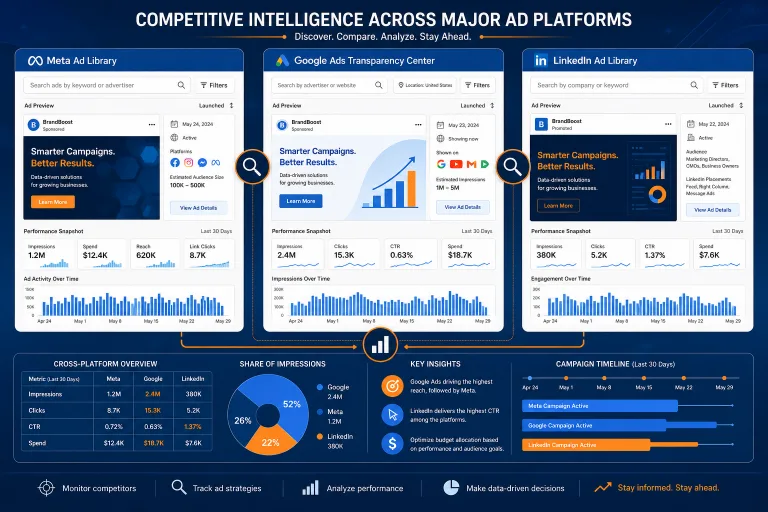
Meta Ad Library is the most useful of the three libraries for affiliates. It covers Facebook and Instagram, shows active and inactive ads, demographic targeting by age and gender, ad spend (ranges), and campaign launch date.
What to Look For
- Long-running campaigns. Sort by launch date. An ad running for 90+ days in iGaming or nutra is a goldmine. Someone is spending money and not turning it off — meaning ROI is positive.
- Thematic clusters. Enter offer keywords (e.g., “casino bonus”, “weight loss”, “crypto signals”) and see how many advertisers are actively running this topic. Many active ones = the niche is alive.
- Geography. Meta shows which countries the ad is shown in. If you see a spike in activity in a specific GEO — it’s a signal that a fresh offer has appeared there or entry barriers have dropped.
- Creative format. Video vs. static vs. carousel. If 80% of the niche uses video — your static banner will lose on CTR.
How to Read the Creative
Don’t copy the creative one-to-one — that’s a path to a ban for plagiarism and combo burnout. Instead, decompose it:
- Persona in the copy — who is the ad talking to? “Tired of losing?” — that’s pain. “Make $500 in an hour” — that’s greed. Understanding the trigger is more important than the visual.
- Creative theme — what pain point is the advertiser targeting? Write down the top 5 themes across 10 long-running ads. This is your content bank for your own tests.
- Landing page — click on the ad and go to the landing page. Often these are non-indexed test pages with positioning experiments that aren’t found in organic search.
Google Ads Transparency Center: Search and Display
Google Ads Transparency Center launched in 2023 and is constantly expanding. Unlike Meta, there is no data on spend and demographic targeting, but it has the main thing — ad texts, landing page URLs, first impression date, and status (active / inactive).
Unique Features
- Search by advertiser. Enter a competitor’s domain and see all their active and past ads in Search and Display. This gives a complete picture of combos: what keywords they test, what landings they use.
- Search vs. Display. The library separates ads by formats. If a competitor is active in Search but not in Display — they work with intent traffic. If vice versa — they buy cheap display inventory.
- Change history. You see all versions of an ad, even those taken off rotation. This allows you to track the evolution of a combo: from the first test to the current iteration.
What to Do With the Data
Make a list of 10-15 advertisers in your vertical. For each, write down:
- Active ads (texts and headlines)
- Landing page URLs (open each, screenshot the structure)
- First impression date (combo age)
- Format (Search, Display, Performance Max)
Repeat the cut in 2-3 weeks. New ads = new tests. Disappeared = failed tests. Remaining = working combos. This is your free spy tool with a 2-week delay, but at zero cost.
LinkedIn Ad Library: B2B Verticals and Beyond
LinkedIn Ad Library is the least popular of the three, but for certain verticals it’s invaluable. If you run B2B offers, SaaS, fintech, education, or lead-gen for corporate products — LinkedIn provides data that Meta and Google don’t have.
What It Shows
- Active and inactive ads
- Launch date
- Format (single image, video, carousel, conversation ad, message ad)
- Targeting by company, job title, industry (in a generalized form)
When to Use It
LinkedIn Ad Library makes sense when:
- Your offer is a B2B product (CRM, analytics, HR-tech)
- You run educational offers (MBA, courses, certifications)
- You work with lead-gen for fintech products
- You test sponsored content in the LinkedIn feed
For classic affiliate marketing (iGaming, nutra, dating, crypto), LinkedIn is less useful — these verticals are almost unrepresented there due to strict policies.
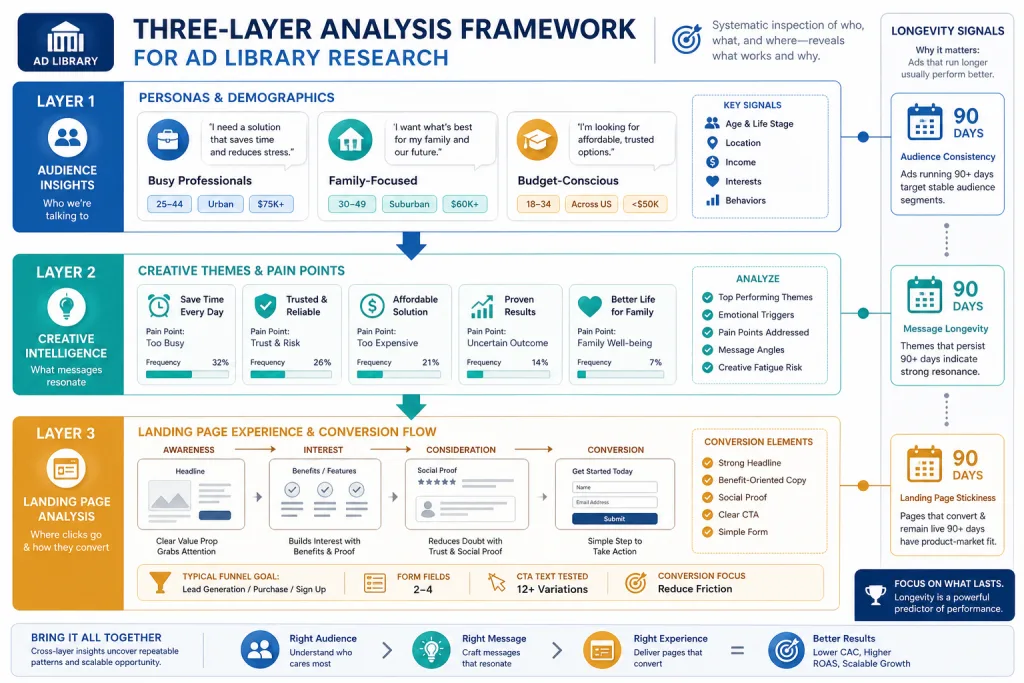
Three Layers of Analysis: Personas, Themes, Landings
Effective competitive intelligence through ad libraries works in three layers. Each layer gives a different type of insight.
Layer 1: Personas in the Copy
Who is the target audience of the ad? Not by demographics, but by psychographics. A casino ad “tired of boring evenings?” — that’s an audience looking for entertainment. “Want to try your luck?” — that’s an audience looking for quick money. Different personas = different landings = different offers.
Write down the persona for each long-running ad. If 7 out of 10 appeal to the same persona — that’s your primary target.
Layer 2: Creative Themes
What pain points does the advertiser target? In iGaming it might be “registration bonus”, “free spins”, “withdrawal in 5 minutes”. In nutra — “lose weight without dieting”, “recover in 30 days”, “natural ingredients”. The theme is not the visual, it’s the promise.
Make a table: theme → number of advertisers → average ad age. Themes with the highest number of long-running ads are proven converters.
Layer 3: Landing Pages
Landing pages that ads from the library lead to are often non-indexed test pages. You won’t find them in Google’s organic results. But that’s exactly where the advertiser tests positioning, offer stack, call-to-action, and funnel structure.
Open 10-15 competitor landing pages. Record:
- Structure (hero → benefits → social proof → CTA)
- Offer stack (what exactly they promise)
- Conversion form (one step or multi-step)
- Presence of a pre-lander or direct link to the offer
Longevity Signals: How to Distinguish a Working Combo from a Test
The main metric in ad libraries is not CTR or spend, but ad lifetime. This is the only reliable signal available for free.
The Three-Month Rule
An ad that runs for 90+ days converts. No one will spend money on non-working ads for three months. This is not an absolute guarantee — maybe the advertiser doesn’t optimize and just drains the budget — but in 80% of cases longevity = positive ROI.
Fast Churn = No Message-Market Fit
If an advertiser changes creatives every 3-7 days, they haven’t found a working combo. You can learn from their mistakes: see what themes they try and discard. This narrows your testing space.
Spike in New Advertisers = Trend
If within 2-3 weeks 5+ new advertisers appear in the library in one niche — it’s a signal of a new trend. Often tied to a new offer, new GEO, or lowered entry barriers. A quick entry into a trend gives cheap traffic before competition drives up CPM.
Practical Workflow: From Intelligence to Combo
Here is a concrete sequence of actions to turn data from ad libraries into a working combo.
- Select 5 competitors in your vertical. Find them through keyword search in Meta Ad Library and Google Ads Transparency Center.
- Take a snapshot of all active ads. Screenshots, texts, landing URLs, launch dates.
- Repeat the snapshot in 14 days. Note what stayed, what disappeared, what appeared.
- Analyze the survivors. Highlight common themes, personas, and formats.
- Open 10 landing pages. Record the structure and offer stack.
- Build your own combo based on the found patterns, but with a unique creative and landing.
- Launch a test. Compare with the metrics you expect from the scouted patterns.
Limitations and Risks of Ad Libraries
Ad libraries are a powerful tool, but they have limitations you need to know before you start making decisions based on them.
- No spend data in Google. Unlike Meta, Google Ads Transparency Center doesn’t even show budget ranges. You don’t know if a competitor spends $100 or $10,000 a month.
- No conversion data. Longevity is a proxy for ROI, but not an exact metric. An advertiser might run an ad due to a long sales cycle, not high conversion.
- Data delay. Ads appear in the library with a delay from a few hours to a few days. You don’t see real-time.
- Not all formats. Google Ads Transparency Center doesn’t always show ads from Performance Max — Google shows them, but without placement details.
- Risk of copying. Direct copying of creatives and landings leads to a ban for plagiarism and quick combo burnout. Use intelligence to understand patterns, not to clone.
Checklist: Competitive Intelligence via Ad Libraries
- Select 5 competitors in your vertical and save links to their pages in the libraries
- Take the first snapshot of all active ads: screenshots, texts, landing URLs, dates
- Repeat the snapshot in 14 days and mark long-runners, disappeared, and new ads
- Decompose the top 10 long-running creatives: persona, theme, format, landing
- Open 10 landing pages and record the structure, offer stack, and conversion form
- Build your own combo based on patterns, but with a unique creative and landing
- Launch a test and compare results with expectations from scouted patterns
How to Automate Monitoring
Manual snapshots every 2 weeks work but don’t scale. If you run 5+ verticals or 20+ competitors, you need automation.
Free Methods
- Google Alerts for competitor domains. Won’t show ads, but will notify you of new pages on the domain.
- RSS feeds of libraries. Meta Ad Library doesn’t have an official API for the ad library, but you can parse pages through browser extensions.
- Spreadsheets with regular updates. Google Sheets with formulas to calculate ad age and track changes.
Paid Tools
If free methods aren’t enough, specialized spy services (AdSpy, BigSpy, PowerAdSpy) give broader coverage, filtering by date, GEO, and format. But for a start and for most verticals, free libraries are enough — they cover 80% of intelligence needs.
Verticals Where Ad Libraries Give Maximum ROI
Not all verticals are equally represented in the libraries. Here is where intelligence through ad libraries works best.
- iGaming. Meta Ad Library shows active casino and betting campaigns despite restrictions. Searching for “casino”, “slots”, “bet” yields hundreds of results.
- Nutra. One of the most active verticals in Meta Ad Library. Long-running ads are direct proof of a working offer.
- Fintech and Crypto. Google Ads Transparency Center is especially useful: search ads for crypto exchanges and investment products are highly visible.
- Education. LinkedIn Ad Library is the best source for scouting educational offers and B2B courses.
- Lead-gen. All three libraries show lead-gen campaigns, but Google and LinkedIn give more B2B context.
FAQ
Can ad libraries be used for blackhat verticals?
Officially no — Meta and Google prohibit blackhat ads. In practice, some blackhat campaigns end up in the libraries before being banned. You can see the creatives, but don’t copy them directly — it’s a direct path to getting your account banned.
How often is data updated in the libraries?
Meta Ad Library updates within 24-48 hours. Google Ads Transparency Center — from a few hours to a few days. LinkedIn Ad Library — within 24 hours. The delay means you see the picture with a lag, but for competitive intelligence this is acceptable.
Do I need to register to use the libraries?
No. All three libraries are available without registration and login. You can search and view ads anonymously. For advanced filters in Meta, a Facebook account may be required.
How do ad libraries differ from paid spy services?
Libraries only show active and recently stopped ads without data on spend, CTR, and conversions. Paid services provide historical data, filtering by more parameters, and analytics. For a start and for 80% of tasks, libraries are enough.
Can I see a competitor’s budget through ad libraries?
Meta Ad Library shows spend ranges (e.g., $0–999, $1000–4999). Google and LinkedIn don’t show budgets at all. Exact spend is impossible to find out, but the range in Meta gives an idea of the scale.