What is Google Ads Asset Studio and Why Media Buyers Need It
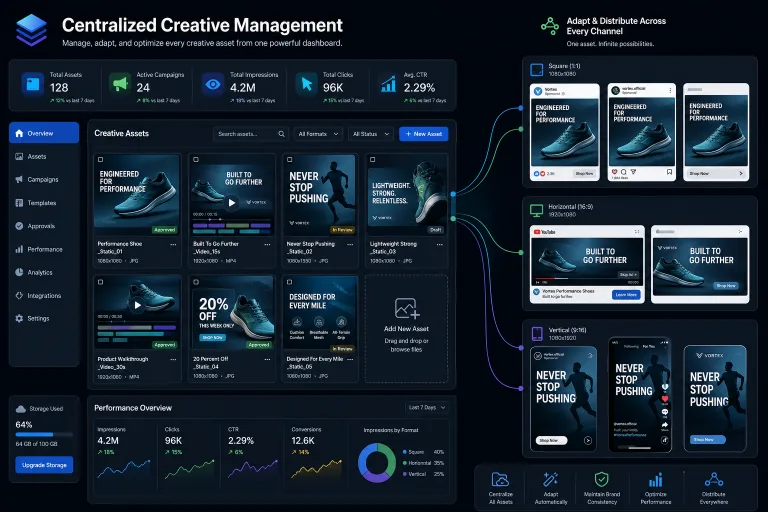
Google Ads Asset Studio is a new centralized interface within Google Ads that brings the creation, editing, and management of advertising creatives together in one place. Previously, media buyers had to manage assets (images, videos, headline texts, descriptions) in a disjointed manner: some within the campaign interface, some in the shared-level library, and some via API upload. Asset Studio eliminates this fragmented workflow and provides a single point of control over the entire creative inventory of an account.
For affiliate teams launching dozens of funnels per week and constantly testing new creatives, this means reduced production time and a lower likelihood of errors—such as an outdated banner remaining in an active campaign because it was forgotten in the library.
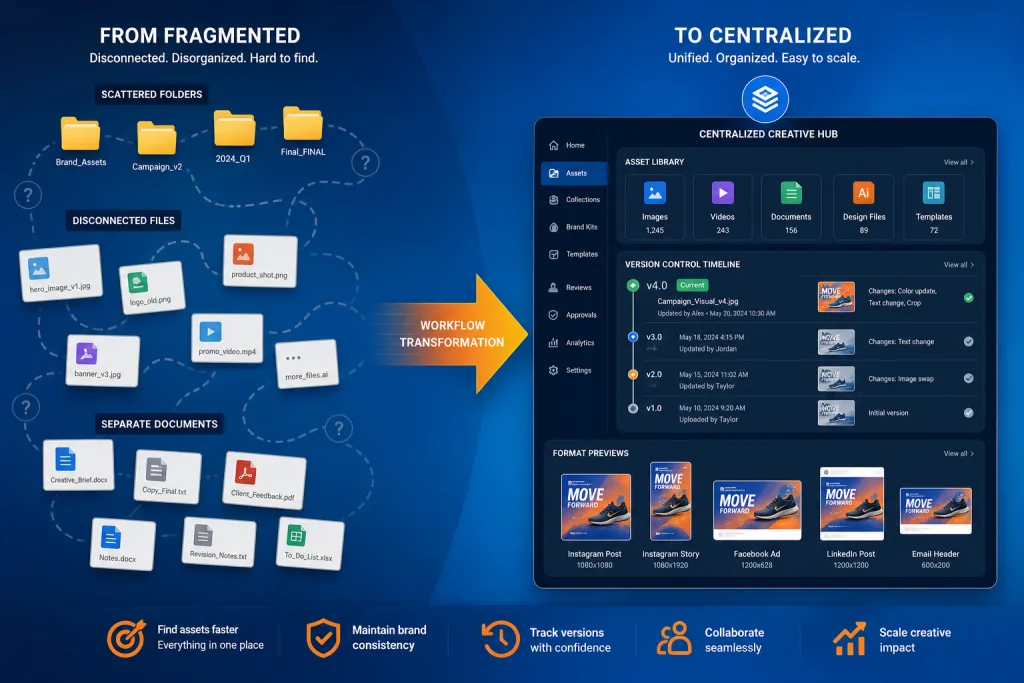
How It Used to Be: Fragmentation of the Creative Process
Before Asset Studio, asset management in Google Ads was scattered across several interface touchpoints:
- Campaign-level assets — uploaded directly in the settings of Performance Max, Display, or Demand Gen campaigns. Changes were applied locally without automatic synchronization with other campaigns.
- Shared asset library — existed but was inconvenient: no bulk editing, no simultaneous visual preview of all formats.
- Google Ads Editor — allowed offline work but did not support all asset types (especially video and complex image assets for PMax).
- API and scripts — required a developer for automation and lacked visual control.
The result: media buyers spent up to 20–30% of their working time not on optimizing bids and funnels, but on creative routine—searching for the right banner, checking formats, duplicating assets between campaigns.
Key Features of Asset Studio
Unified Creative Library
All assets—images, logos, videos, headline and description texts—are now available in a single interface. You can filter by type, format, status (used / unused), and creation date. For affiliate teams working with a large volume of creatives, this solves the problem of “where is that banner that showed a good CTR on nutra last month.”
Bulk Editing and Replacement
Asset Studio allows you to replace an asset across multiple campaigns at once. For example, if you discover that a certain headline violates an updated Google policy, you can deactivate it in all campaigns with a single action, rather than going into each one separately.
Visual Preview by Format
The tool shows how a creative will look in different placement formats—from a square image in Discovery to a horizontal banner in Display and a vertical video in YouTube Shorts. This is critical for PMax campaigns, where Google automatically mixes assets across dozens of placements.
Version Control
Each asset retains a version history. You can roll back to a previous version of an image or text if the new one shows a worse CTR. For affiliates who constantly A/B test creatives, this replaces manual version tracking in spreadsheets.
How Asset Studio Impacts the Workflow of an Affiliate Team
Speed of Launching New Funnels
The centralized library shortens the launch cycle of a new funnel. Instead of re-uploading images and writing headlines from scratch each time, you reuse proven assets from the library and adapt them for a new offer or GEO. For teams launching 5–10 new campaigns a day, this saves hours.
Quality Control and Compliance
In affiliate marketing, compliance is a constant headache. Google regularly updates its policies, especially in sensitive verticals: nutra, gambling, finance. Asset Studio allows you to quickly check all active creatives for compliance with current requirements and promptly replace problematic assets before the account receives a warning.
Team Collaboration
For agencies and media buying teams with multiple specialists working in the same MCC, Asset Studio provides shared context. The creative producer uploads assets, the buyer uses them in campaigns, and the team lead sees the whole picture. Previously, this required external tools—from Google Drive to Notion tables.
Practical Scenarios for Affiliates
Scenario 1: Scaling a Funnel to a New GEO
You launched a funnel for a nutra offer in Germany with a set of 12 images and 8 headlines. The offer opened in Austria. Instead of creating everything from scratch, you open Asset Studio, duplicate the asset group, replace the texts with the local language, and launch a new campaign in 15 minutes instead of an hour.
Scenario 2: Cleanup After a Ban Wave
Google conducted a massive sweep of creatives in the nutra vertical. Your account received 3 warnings for different campaigns. Through Asset Studio, you find all assets flagged as policy-violating, deactivate them in all campaigns simultaneously, and upload new versions—without needing to go into each campaign separately.
Scenario 3: A/B Testing Creatives in PMax
Performance Max automatically tests asset combinations, but without a structured approach, the results are hard to interpret. In Asset Studio, you can create clear asset groups (e.g., “aggressive angle” vs. “neutral angle”) and track which group performs better, using asset performance reports in combination with library data.
Limitations and What’s Still Missing
Asset Studio is a powerful tool, but not without limitations. Here is what media buyers need to consider:
- No integration with external DSPs. If you work not only in Google Ads but also in Taboola, Outbrain, or Meta, assets will have to be duplicated manually. There is no single creative hub for all platforms.
- Limited API automation. At the time of launch, API access for managing assets through the library is limited. Teams that use scripts for bulk creative generation cannot yet fully automate the workflow.
- No built-in AI creative generator. Unlike Meta Advantage+ Creative, which offers AI generation of variations, Asset Studio currently focuses on management, not creation. Google may add AI features later, but for now, you need external tools for generation.
- Dependency on account structure. If you have a complex MCC structure with dozens of accounts, assets are not synchronized between accounts automatically. Each account has its own library.
Comparison with Alternatives
Media buyers use different approaches to creative management. Here is how Asset Studio compares to alternatives:
| Approach | Pros | Cons |
|---|---|---|
| Google Ads Asset Studio | Built into Google Ads, free, visual preview | Only for Google Ads, no AI generation |
| Google Ads Editor | Offline work, bulk operations | No visual preview, limited video support |
| External DAM platforms (Bynder, Frontify) | Cross-platform, version control | Paid, no direct integration with Google Ads |
| Google Drive + Spreadsheets | Free, flexible | Manual process, high risk of errors |
For most affiliate teams, Asset Studio is a sufficient tool if the main volume of traffic goes through Google Ads. For those working multi-channel, it complements but does not replace an external DAM.
Impact on Performance Max and Automated Formats
Asset Studio is especially important for PMax campaigns, where Google automatically combines assets into dozens of formats. Previously, control over which assets were used in PMax was minimal—you uploaded a set and hoped the algorithm would choose the best.
Now you can:
- See all assets tied to a PMax campaign in one place.
- Track the performance of each asset (impressions, clicks, conversions).
- Replace weak assets without pausing the campaign.
- Structure assets into groups for more controlled testing.
This does not give full control over how Google mixes creatives, but it significantly increases transparency.
Transition Strategy for Existing Teams
If you already have dozens of campaigns with hundreds of assets, transitioning to Asset Studio does not happen automatically. The recommended approach:
-
Audit current assets. Export a list of all active assets from Google Ads Editor or via API. Find duplicates, outdated versions, and creatives that no longer comply with policy.
-
Structure the library. Develop a naming convention: vertical — GEO — angle — format — version. For example:
nutra-DE-aggressive-square-v3. This will help search for assets in Asset Studio. -
Priority migration. Start with the most active campaigns with the largest budget. Move their assets to the structured library, then move on to lower priority ones.
-
Set up the process. Define who in the team is responsible for uploading, compliance checking, and replacing assets. Asset Studio works best when there is a clear division of roles.
Checklist: Setting Up Work with Asset Studio
- Audit all active assets in the MCC and remove duplicates
- Develop a unified asset naming convention (vertical-GEO-angle-format-version)
- Move assets of the top 10 campaigns by budget to the structured library
- Assign a person responsible for creative compliance checks once a week
- Set up a process for replacing assets in PMax based on asset performance data
- Document the workflow for new team members
Risks and Pitfalls
False Sense of Control
Asset Studio provides visual control, but it does not mean full control over how Google uses your assets. The PMax algorithm still makes its own decisions about which combinations to show. Do not confuse library management with impression management.
Dependency on a Single Platform
If 80% of your traffic goes through Google Ads, Asset Studio is a great tool. But if you are a multi-channel buyer, concentrating the creative process in one platform can create a problem when you need to quickly adapt creatives for Meta, TikTok, or native networks.
Policy Risks During Bulk Replacement
When you replace an asset in all campaigns simultaneously, there is a risk that the new creative will not pass moderation everywhere. If Google flags the new asset as policy-violating, it could affect all campaigns where it is activated. Always test a new asset on one campaign before bulk deployment.
FAQ
Is Asset Studio free?
Yes, Asset Studio is a built-in Google Ads tool available to all advertisers at no additional cost. You only pay for ad placement as usual.
Can I use Asset Studio for multiple accounts in an MCC?
Each account in an MCC has its own Asset Studio library. There is no direct synchronization of assets between accounts—you need to upload them separately to each account or use Google Ads Editor for bulk operations.
Does Asset Studio support video assets?
Yes, Asset Studio supports the management of video assets, including horizontal, square, and vertical formats for YouTube and Discovery placements in PMax.
Does Asset Studio replace Google Ads Editor?
No, these are different tools with different purposes. Editor works offline and is convenient for bulk operations with bids and settings. Asset Studio focuses on visual creative management. They complement each other.
How does Asset Studio affect the speed of creative moderation?
Asset Studio does not speed up the moderation process itself, but it allows you to react faster to rejections—you see the status of each asset and can promptly replace a rejected creative in all campaigns.
Conclusion
Google Ads Asset Studio is not a revolution, but an evolution that addresses a long-standing pain point for media buyers: chaos in creative management. For affiliate teams working with a large volume of campaigns and constant testing, it is a tool that saves hours per week and reduces the risk of compliance violations. It does not replace external DAM platforms for multi-channel buyers and does not provide AI generation like Meta Advantage+ Creative, but within the Google Ads ecosystem, it is a significant step forward. Teams that structure their creative library and implement a clear process for working with Asset Studio will gain an advantage in launch speed and control quality—and in affiliate marketing, speed often decides everything.