What is Malvertising and Why It Hits Media Buyers Hard
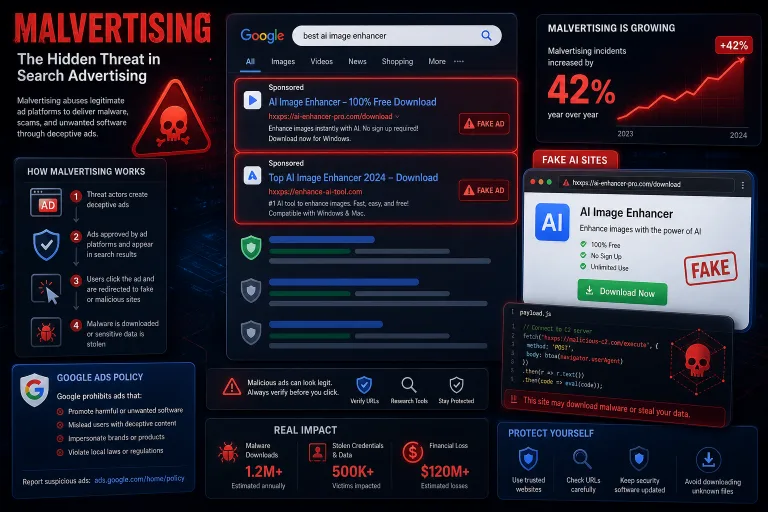
Malvertising is the use of legitimate ad networks to deliver malware, phishing, and fraudulent sites to end users. According to the Transnational Organized Crime Threat Assessment by UNODC, malvertising incidents grew by 42% year-over-year in 2025. Criminal groups, including networks linked to Vietnam and targeting Southeast Asian countries, systematically purchased paid ads on social media and search engines to promote fake websites mimicking popular generative AI tools.
For media buyers, this is not an abstract threat from the world of cybersecurity. Malvertising strikes directly on three fronts: it increases competition for ad inventory, intensifies moderation and bans in Google Ads, and undermines user trust in search advertising overall. Every time Google responds to a surge in malvertising by tightening policies, legitimate media buyers get caught in the crossfire.
How Fake Search Ads Bypass Google Ads Moderation
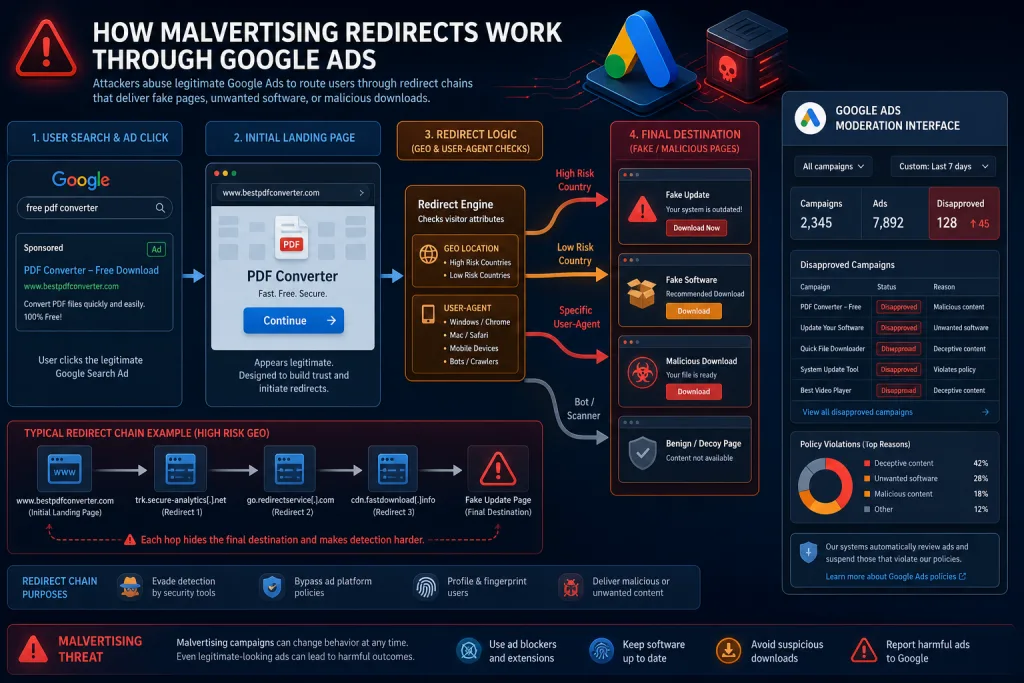
The attack mechanics look like this: scammers create campaigns in Google Ads with ads that look legitimate at first glance. The creatives mimic well-known brands — ChatGPT, Midjourney, Canva, Adobe Firefly. The URL in the ad might point to a real domain, but after a click, the user is redirected through a chain of redirects to a fake download page, where malware or an infostealer is installed instead of the app.
The key problem for Google Ads: moderators only see the first level — the ad text and the target URL. Redirects that trigger based on geo, time of day, user-agent, or referrer are extremely hard to detect automatically. This is the same cloaking mechanics used by media buyers to bypass moderation, but in the hands of cybercriminals.
According to Mandiant (Google Cloud), criminal groups created hundreds of fake websites mimicking generative AI tools. Some of them were promoted specifically through paid ads in search and social media. The scale is so massive that Google is forced to respond with mass purges — and legitimate advertisers often suffer in these purges.
Three Ways Malvertising Impacts Media Buyers
1. Rising CPCs and Inventory Competition
Scammers buying ads to deliver malware don’t skimp on bids. Their economics are built on stealing data, cryptocurrency, and accounts — the margin of a single successful attack can be thousands of dollars. This means they are willing to pay above-market CPMs and CPCs, inflating the auction in competitive niches: software, AI tools, finance, crypto. A media buyer running the same categories gets more expensive traffic without an increase in conversions.
2. Stricter Moderation and False Bans
Every surge in malvertising prompts Google to tighten automatic filters. After a wave of fake AI sites, Google Ads increased scrutiny on ads related to software downloads, AI tools, and free services. The result: legitimate media buyer campaigns leading to landing pages with download buttons or free-trial offers get increased attention from moderators. Bans for “suspected malvertising” are becoming a new headache for buyers.
3. Declining Trust in Search Ads
When users massively encounter fake ads on Google, their trust in sponsored results drops. This affects the CTR of legitimate ads: users start scrolling past search ads to organic results more often. For media buyers working with Google Search Ads, this means lower click-through rates at the same bids — and, consequently, a higher cost per conversion.
How Fake AI Sites Exploit Brand Traffic
The UNODC report specifically highlights the scheme with fake generative AI tool websites. Criminals register domains resembling well-known brands (chatgpt-download, midjourney-free-app, canva-ai-tool) and launch Google Ads campaigns for branded queries. A user searching for “ChatGPT download” or “Midjourney free” sees the fake site at the top of the sponsored results.
This has a double effect for media buyers. First, if you are running legitimate AI offers or white-label AI services, your ads compete with fake ones in the same auction. Second, after purges, Google may temporarily pause all campaigns related to branded queries for AI tools — including yours.
Strategies to Protect Your Google Ads Campaigns
Separate Branded and Non-Branded Traffic
If you work with offers related to AI tools, software, or free services, split campaigns by query type. Branded campaigns (by product names) are currently in the maximum risk zone — both due to competition with malvertisers and moderation. Non-branded queries (“AI image generator”, “free AI text editor”) are less prone to bans.
Use Verified Landing Pages
Google Ads increasingly checks not only the ad text but also the landing page. Ensure your landing page matches the promised creative: if the ad promises a “free AI generator,” the landing page must have exactly a free tool, not a redirect to a paid offer. Any mismatch is a red flag for Google’s automated systems, especially in the current environment.
Monitor Anomalies in Bids and CTR
If you see a sharp increase in the minimum bid to enter the auction for a specific keyword — this could be a signal that a malvertiser with an unlimited budget has entered the auction. In such cases, temporarily pause the campaign or shift the budget to adjacent queries. An abnormally high CTR on a specific ad could also mean scammers are copying your creative.
Compliance: How to Avoid Falling Under Suspicion
Google Ads publishes policies regarding malware, but in reality, automated systems don’t always distinguish a legitimate media buyer from a malvertiser. Here are practical steps to reduce the risk:
- Do not use conditional redirects. Cloaking, which redirects moderators to one page and users to another, is exactly the mechanics Google looks for first.
- Keep SSL certificates up to date. An expired or invalid SSL is a red flag for Google’s security systems.
- Do not use hyphenated domains mimicking well-known brands. chatgpt-ai-tool.com is a pattern Google associates with phishing.
- Check domain reputation. Use Google Safe Browsing and VirusTotal before launching a campaign on a new domain.
- Keep your account history clean. Accounts with a history of bans or warnings receive an increased level of scrutiny when launching new campaigns.
Impact on Different Affiliate Verticals
Malvertising does not affect all verticals equally. Here is the risk distribution across main categories:
High risk: AI tools, software, antiviruses, VPNs, crypto wallets, free services. These categories are the main target of malvertisers, and this is where Google intensifies moderation.
Medium risk: finance, insurance, education, telecom. Less direct connection to malware delivery, but increased sensitivity to compliance.
Low risk: e-commerce, gambling, dating, nutra. These verticals have their own compliance risks but do not directly intersect with malvertising.
If you work in high-risk verticals, allocate extra time for moderation (up to 5–7 days instead of the usual 24–48 hours) and have backup domains and accounts.
Geography: Where Malvertising Hits Hardest
The UNODC report focuses on Southeast Asia, but malvertising is a global problem. For media buyers, it’s important to understand which GEOs are currently in Google’s heightened focus zone:
- Southeast Asia (Vietnam, Thailand, Indonesia, Philippines) — the epicenter of attacks, Google has tightened filtering for these GEOs.
- USA and Europe — primary targets of attacks, but moderation here works faster and stricter.
- Latin America and Africa — a growing region for malvertising, but currently less monitored by Google.
If you run traffic to Southeast Asian GEOs, expect longer reviews and more frequent bans. Split campaigns by GEO so that a ban in one region doesn’t halt the entire account.
What to Do If Your Campaign is Flagged as Malvertising
If Google Ads suspends your campaign with a malware policy violation flag, act quickly:
- Check the landing page via Google Safe Browsing Diagnostic. If the domain is flagged — this is a priority issue.
- Scan the landing page for third-party scripts. Malicious code often gets in through compromised WordPress plugins or third-party widgets.
- Remove all redirects and intermediate pages. Submit the campaign for re-review only with a direct URL.
- File an appeal through Google Ads Policy Review. State that your site contains no malware and attach the scan report.
- If the ban recurs — use a new domain and a new account. Repeated violations on one account reduce the chances of a successful appeal.
Checklist: Protecting Google Ads Campaigns from Malvertising Risks
- Separate branded and non-branded campaigns — branded ones are in the high-risk zone
- Check all landing pages via Google Safe Browsing and VirusTotal before launching
- Remove all conditional redirects and cloaking — this is the main trigger for Google’s systems
- Use clean domains without mimicking well-known brands and hyphens
- Monitor bid anomalies — a sharp spike in minimum price might mean a malvertiser entered the auction
- Keep SSL certificates up to date and scan landing pages for third-party scripts
The Future: How Google Will Fight Back and What It Means for Buyers
Google is investing in automated malvertising detection systems, but according to UNODC, the scale of attacks is growing faster than the platforms’ ability to block them. In 2026, several changes are expected that will impact media buyers:
Stricter advertiser verification. Google already requires identity verification for advertisers in several countries. It is expected to expand to all GEOs, making it harder to create spam accounts but adding friction for legitimate buyers.
AI detection of fake sites. Google Cloud (via Mandiant) is actively developing tools to detect fake AI sites. Some of these technologies will be integrated into Google Ads moderation.
AI ad labeling. Google has already introduced a “how this ad was made” label for AI-generated creatives. In the context of malvertising, this could expand to a label indicating that the advertised product itself is an AI tool — with additional scrutiny.
For media buyers, this means one thing: compliance is no longer an auxiliary function, but a core competency. Buyers who know how to operate within tightening policies will gain a competitive advantage — cheaper traffic on legitimate campaigns, fewer bans, and more stable ROI.
FAQ
How is malvertising different from regular click fraud?
Click fraud is inflating clicks on ads to drain competitors’ budgets. Malvertising is using legitimate ad networks to deliver malware to end users. The former hits the advertiser’s wallet, the latter hits user security and platform reputation.
Can Google ban my account if a competitor copies my creative for malvertising?
Yes, this is a possible scenario. If a scammer copies your creative and uses it on a fake domain, Google’s automated systems might link your account to the malicious activity. Regularly check your creatives via reverse image search and report copies.
Which affiliate verticals are most at risk of bans due to malvertising?
AI tools, software, antiviruses, VPNs, crypto wallets, and free services. These categories are the main targets of malvertisers, and Google intensifies moderation on them specifically. If you work in these niches, allocate extra time for moderation and have backup domains.
Should I abandon branded campaigns in Google Ads because of malvertising?
A complete abandonment isn’t necessary, but splitting campaigns is mandatory. Keep branded campaigns on a separate account with a clean history, use verified domains, and monitor CTR. If you see anomalies — pause and shift the budget to non-branded queries.
How do I check if my domain is flagged as malicious in Google?
Use Google Safe Browsing Diagnostic (enter google.com/safebrowsing/diagnostic?site=yourdomain). Also check the domain via VirusTotal and Google Search Console — security issue notifications will appear there.